.svg)



Xtract for Alteryx
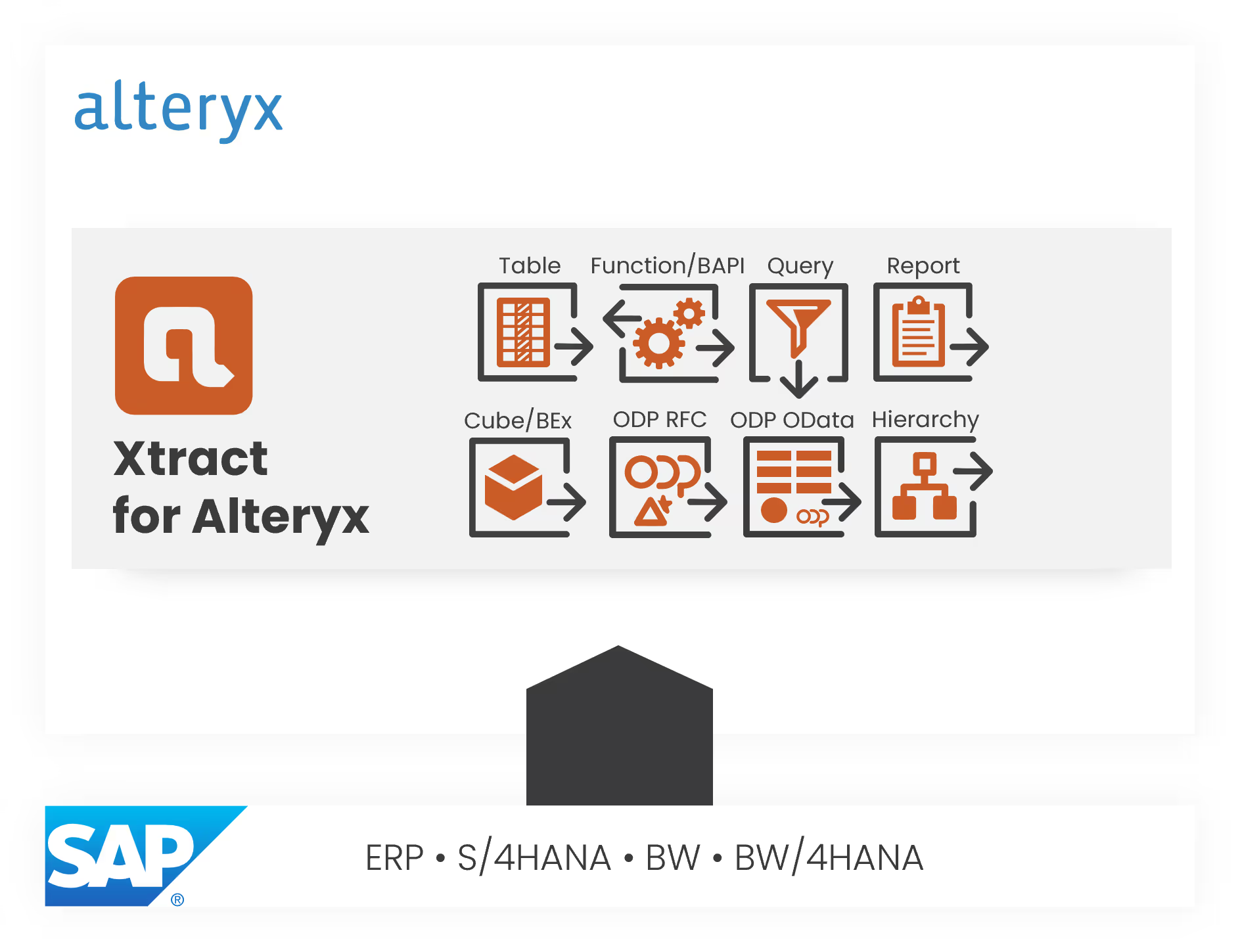
Load your SAP data directly into Alteryx – simply via drag & drop using the Xtract for Alteryx toolbox for Alteryx Designer.



Integrate SAP Data Directly
Into the Alteryx Data Flow
Xtract for Alteryx integrates seamlessly into the Alteryx Designer tool palette and supports organizations that want to use SAP data efficiently for analytics, reporting, or automation in Alteryx.
No more exporting or converting SAP data manually. Everything happens right where you already work – in Alteryx Designer.
- Direct connection between Alteryx and SAP (ERP, BW, HANA, BW/4HANA)
- Access to tables, InfoCubes, BAPIs, DataSources, CDS views, reports
- High-performance extraction of large SAP tables
- Drag-and-drop configuration – no ABAP development required
- Multiple parallel extractions
- Incremental SAP data updates for recurring workflows

Your Advantages with Xtract for Alteryx

through optimized extraction processes (Symrise AG)
Very fast installation and configuration.

Robust, standardized process for incremental loads (Delta Logic).
- Fast, simple & user-friendly; programming knowledge not necessary
- Cross-module and module independent
- 100 % type safety with full meta data support
- Minimal to zero modification in your SAP system
- Business logic is available
- Cost savings through optimal integration, no friction losses

More Flexibility in Alteryx Designer
Xtract for Alteryx is designed for analytics teams and business analysts who want to work with SAP data without coding skills. Whether sales, finance, procurement, materials management, or HR – your SAP data is available almost instantly.
With the building blocks of Xtract for Alteryx, you can model complex data flows and integrate SAP data into your Alteryx processes without media breaks.

Everyday benefits:
- Easy connection to one or multiple SAP systems
- Broad range of use cases thanks to access to all common SAP data sources and objects (e.g., tables, InfoCubes, BAPIs, DataSources, CDS views, reports, and more)
- No programming effort – no ABAP scripts or development resources required
- High performance during data extraction, even for large datasets and mass-data processes
- Flexible, dynamic workflows thanks to parameterizable filters and controllable extraction logic
This reduces development effort, minimizes error sources, and significantly speeds up your time-to-insight.
What Xtract for Alteryx Can Do:


Maximum flexibility in BW data extraction
The BW Cube component implements SAP’s OLAP BAPI interface (MDX) as well as the native BICS interface. It is therefore possible to extract traditional BW objects, such as BW or BEx queries, cubes, and MultiProvider. At the same time, the component supports both the new HANA-based BW objects and the objects of an S/4HANA embedded BW. The BW Cube component supports BEx variables and dimension filtering, thus enabling the extraction of large amounts of data with a packetizing and slicing function.


Directly extract SAP ERP queries from the SAP system
The Query component lets users extract SAP ERP queries right from the SAP system. There is no need to tediously recreate existing queries and their respective business logic outside of SAP, because you can simply continue using them instead.


Incremental SAP data loading: Fast & easy
This component is our champion when it comes to mapping data or changes in your SAP system in near real time and as easily as possible. Data from different data sources is integrated to consolidate all changes in one central system. Unlike a full data load, where all records in a table are transferred from the source to the target database, Table CDC captures only the changes to the data since the last load. This reduces the amount of data that needs to be transferred, resulting in faster and more efficient transfers. This ensures that you always have access to the latest and most up-to-date data, saving resources and time.


Extract SAP tables – fast, flexible, and effortless
Reliable, high-performance extraction of SAP tables (transparent tables, cluster tables, and views) is easier than ever before thanks to the Table component.
This component comes with our custom ABAP package for table extraction but also supports standard SAP function modules. What´s more, joining SAP tables prior to extraction via Open SQL statement is also possible. This replaces the need for manually creating views or SAP queries on the SAP side.


Call BAPIs and RFC function modules with ease
With the BAPI component, it is possible to call BAPIs and RFC function modules. At the same time, the component can be used as both the data source and - depending on the Xtract product - the target data (write-back). Users can extract or populate the BAPI’s import/export and table parameters.


Extract hierarchies from SAP BW – high-performance, flexible, delta-capable
The Hierarchy component makes it possible to extract hierarchies from an SAP BW system. At the same time, this component gives users the option to extract the data in its original parent/child format. The hierarchies can also be broken up, however, and the individual hierarchy levels extracted as column headers in a flat table.
Through Open Hub Services (OHS), SAP provides an extraction method for a range of BW source objects. OHS is a particularly interesting choice when it comes to exporting mass data from SAP BW and provides an integrated delta mechanism when using SAP DTPs. Theobald Software supports the OHS component for BW/4 HANA as well.


Use ABAP reports as a data source
This component makes it possible to use ABAP reports as a data source. This guarantees the extraction and thus continued use of existing, customer-specific ABAP reports or of standard reports provided by SAP. Users can simply adopt existing reports and their respective business logic instead of wasting time to recreate them outside of SAP.


The gold standard for SAP data extraction
These components are the crème de la crème when it comes to extracting data from SAP. With the help of the DeltaQ component, users can extract what are known as SAP DataSources. The main benefit of DataSources is the integrated mechanism for incremental data extraction - a function also employed by SAP BW.
DeltaQ and ODP enable the use of DataSources and thus eliminate the need for an SAP BW. The ODP component is Theobald Software’s response to the new SAP ODP extraction types. This component can also be used to extract SAP DataSources, as well as CDS views, BW/4HANA objects, and other data sources.

Lorem Ipsum test test test


Full table extractions have changed significantly with Xtract Universal. For certain tables, we’ve seen a 15x improvement in loading times — an impressive gain. Now, we can provide data much earlier, update it more frequently, and significantly increase the value for our applications and reporting solutions.

By being able to perform delta loads instead of full loads with Table CDC, we can update our SAP data stocks more frequently in the future, even in near real-time if necessary. Instead of reloading a table with 30 million rows each time, we now only update about 1,000 rows that have changed. Instead of an hour, the loading process now takes only a few minutes.

Get Your 30-Day Trial Version!


Frequently Asked Questions About the Alteryx SAP Connector

Still Have Questions?
If you'd like to learn more, visit our Help Center – you'll find answers to many common questions there. Prefer to talk to someone directly? Get in touch, we're happy to help.